Public experiment and reproducible methodology
What AI Crawlers Actually See in Next.js: An Eight-Route Rendering Lab
Next.js pages can look complete in a browser while presenting very different evidence in the initial response. Static shells, request-time Server Components, streamed metadata and client-only content all change where important text and metadata first appear.
Evidence status: this article contains publication-ready source analysis and a complete lab protocol. It does not invent runtime observations. Raw captures, screenshots and result claims must be produced on the owned test deployment and approved by a human before this is presented as a completed results paper.
This experiment supports the noncommercial learning mission of AnandRIyer.com: publish the code, evidence and limitations so that readers can inspect the reasoning rather than accept a discoverability claim on trust.
The problem is three representations, not one
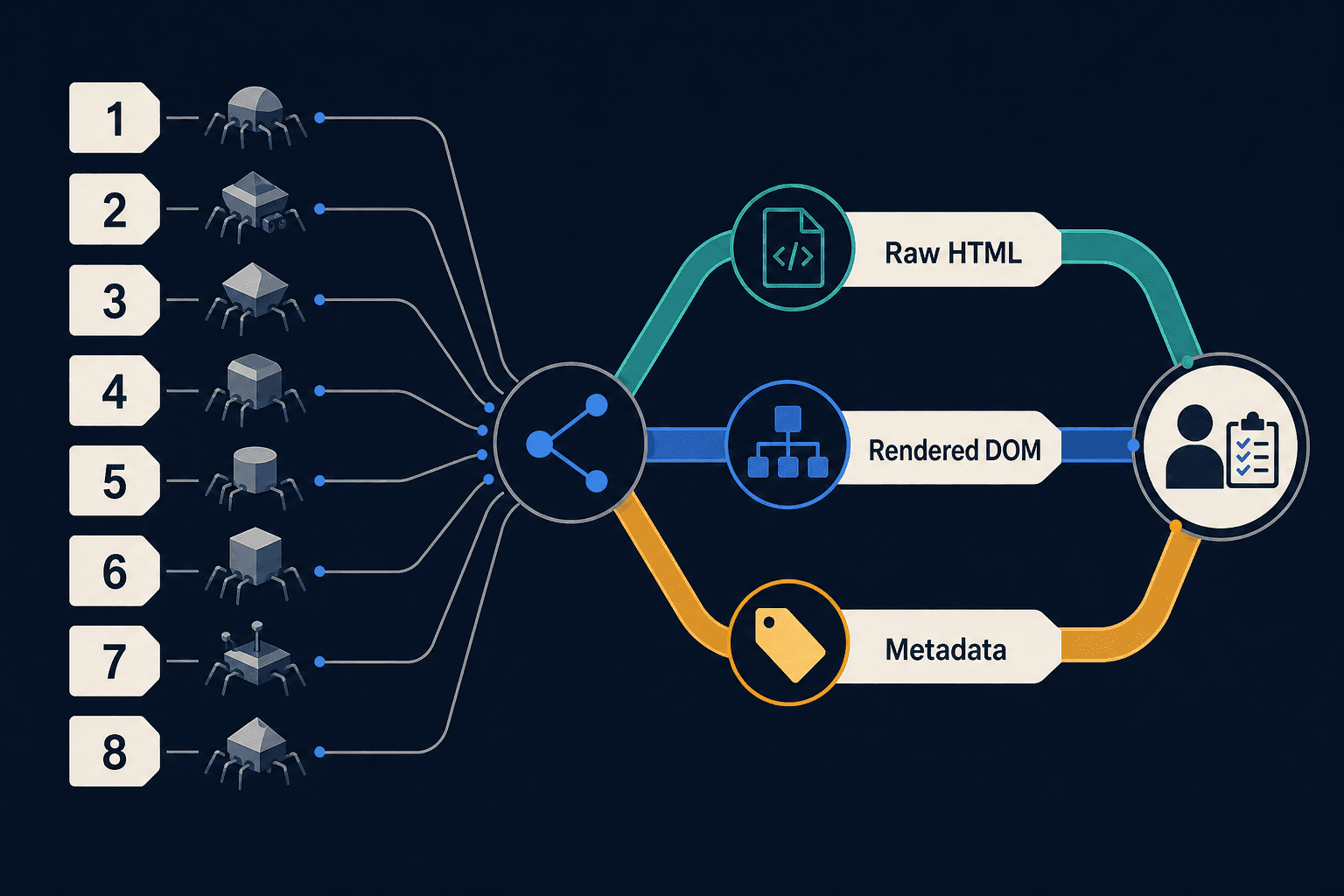
Asking what a crawler sees is ambiguous. At least three representations matter: the bytes available in the first response chunk, the completed HTTP response after streaming finishes, and the DOM produced after a browser executes JavaScript. A fourth record—the metadata extracted from each representation—makes differences easier to compare.
Next.js documents that request-time generateMetadata work can resolve after the initial UI has been sent. The resulting tags may be appended later in the response. User agents classified as HTML-limited instead receive blocking metadata in the document head. Static routes do not need this metadata stream because their metadata can be resolved during prerendering. See the official generateMetadata behavior and htmlLimitedBots reference.
The rendered DOM may differ again. Modern React can move document-level meta elements and title elements into the document head. A browser inspection can therefore look healthy even when the same tags were absent from the early response.
Google publicly describes separate crawling and rendering stages and says server-side or prerendered content remains useful because not every bot executes JavaScript. That makes Googlebot a valuable JavaScript-capable control, not a universal model for AI crawlers. The distinction is explained in Google's JavaScript crawling documentation.
What source inspection establishes
The experiment pins Next.js 16.2.9 rather than using an unversioned latest dependency. Its versioned bot-detection source includes Bingbot and several preview crawlers in the blocking-render regular expression. It does not list OAI-SearchBot, GPTBot, ChatGPT-User, ClaudeBot, Claude-SearchBot, Claude-User, PerplexityBot or Perplexity-User.
An exact request carrying those tokens therefore does not match that pinned regular expression. For a route with genuinely request-time metadata, the source-level expectation is that the default deployment will select the streaming path. This is a falsifiable expectation, not proof of how a provider parses, renders, stores or cites the response.
The provider documentation also separates crawler purposes. OpenAI distinguishes search, training and user-triggered agents. Anthropic documents equivalent categories, and Perplexity distinguishes its automatic search crawler from its user-triggered fetcher. These roles should be tested and reported separately.
The eight controlled routes
Every route uses unique markers for its title, description and primary body claim. Markers make automated detection more reliable than comparing general prose.
| Route | Controlled implementation | Question |
|---|---|---|
| R1 Static baseline | Static metadata and static Server Component body | What is present in the earliest complete shell? |
| R2 Cached component | Async evidence component marked with 'use cache' | Does cached evidence enter the prerendered shell? |
| R3 Request-time body | Static metadata; connection() inside Suspense | When does server-rendered runtime text arrive? |
| R4 Streamed metadata | Delayed request-time metadata; fast shell and runtime marker | Is metadata in the initial head, later body or rendered head? |
| R5 Metadata and body streams | Delayed metadata plus two differently timed Suspense regions | What is the ordering of metadata and content chunks? |
| R6 Client-only claim | Primary marker appears only after a client effect | Which captures entirely miss the page's main claim? |
| R7 Progressive enhancement | Core prose and citations on the server; controls on the client | Can interactivity be added without hiding evidence? |
| R8 Mixed production route | Static intro, cached evidence, runtime status and client tools | How does a realistic mixed route degrade? |
The caching routes follow the official Cache Components model. The experiment uses use cache for reusable evidence and connection to force selected work to request time.
Two deployment profiles isolate metadata streaming
Deploy the same routes twice. Profile A uses the framework's default bot list. Profile B is a test-only build that disables streaming metadata for every user agent. Do not silently promote Profile B to production.
// Profile A: framework default
const nextConfig = { cacheComponents: true }
export default nextConfig

// Profile B: diagnostic build only
const nextConfig = {
  cacheComponents: true,
  htmlLimitedBots: /.*/,
}
export default nextConfig
This comparison is safer than adding only AI tokens to a production regex. Next.js states that a custom htmlLimitedBots expression replaces its default list, so an incomplete override can unintentionally change the handling of established preview and search crawlers.
Representative streamed-metadata route
import type { Metadata } from 'next'
import { connection } from 'next/server'
import { Suspense } from 'react'

const sleep = (ms: number) =>
  new Promise(resolve => setTimeout(resolve, ms))

export async function generateMetadata(): Promise<Metadata> {
  await connection()
  await sleep(1200)
  return {
    title: 'LAB-R4-TITLE-7F2',
    description: 'LAB-R4-META-7F2',
  }
}

async function RuntimeMarker() {
  await connection()
  return <p data-marker='LAB-R4-RUNTIME-7F2'>
    Request-time marker
  </p>
}

export default function Page() {
  return <main>
    <h1>R4: Streamed metadata</h1>
    <p data-marker='LAB-R4-SHELL-7F2'>Static shell marker</p>
    <Suspense fallback={<p>Waiting for runtime marker…</p>}>
      <RuntimeMarker />
    </Suspense>
  </main>
}
Methodology: capture three layers, not one
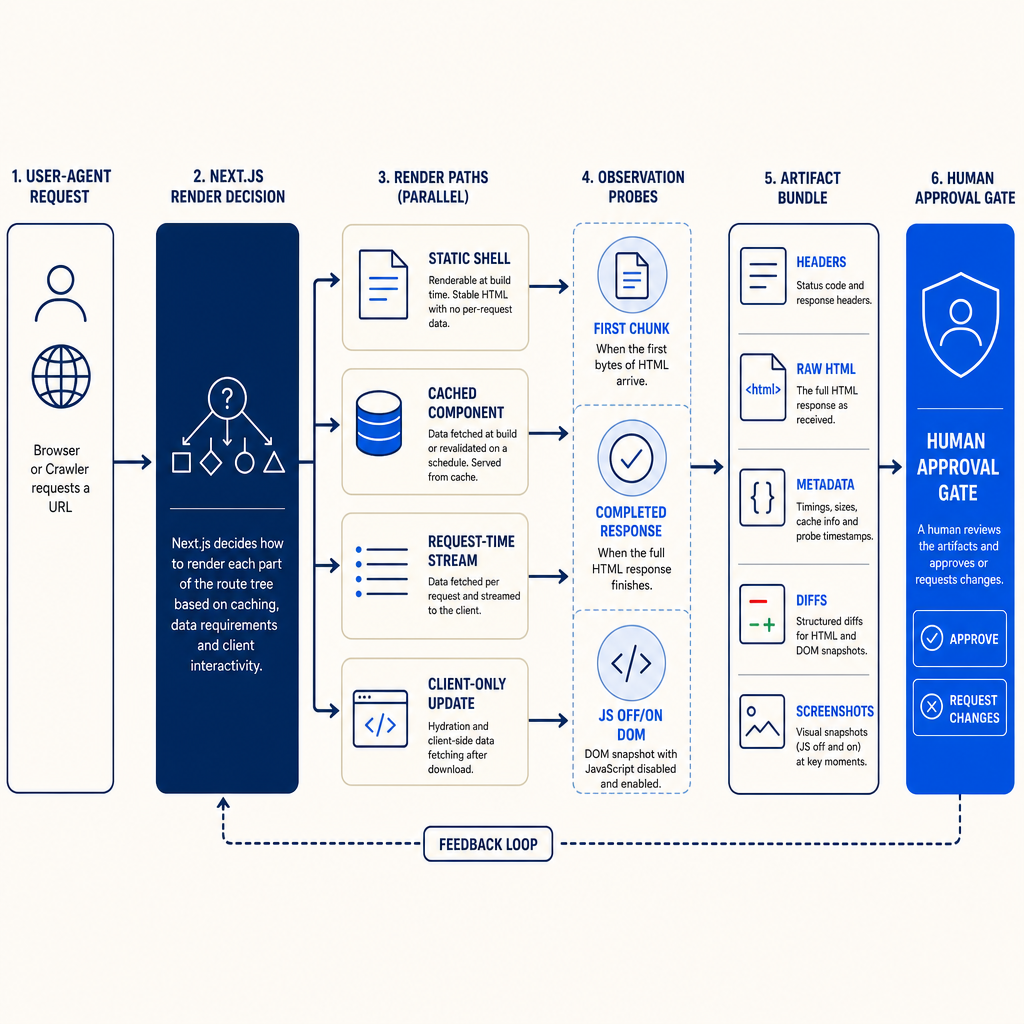
- Freeze the environment. Record the Next.js, React and Node versions, package lockfile, source commit, deployment identifier, region, CDN and WAF settings. Save the production
next buildoutput. - Use an explicit user-agent matrix. Include a normal browser, Googlebot as a rendering control, Bingbot as a default HTML-limited control, and the official search, training and user-triggered tokens from the three AI providers. Use full provider-published strings where available. Label token-only Anthropic requests as synthetic.
- Capture transport evidence. Request identity encoding and HTTP/1.1 for a comparable baseline. Save status, headers, chunk arrival times, byte counts and the completed body. The curl options for user agents, unbuffered output and trace timing provide an independent trace.
- Capture browser evidence twice. Use Playwright emulation with JavaScript disabled and enabled. Save
page.content(), the document title, selected head metadata, main text, console errors and a fixed-size screenshot. Playwright's Page API supports both serialized DOM and screenshot capture. - Repeat and label cache state. Run at least five requests per route, user agent and profile. Separate first request after deployment from warm repetitions. Do not add arbitrary query parameters unless that variation is itself documented.
- Generate machine-readable diffs. Compare head contents, body markers, main text, headers and timings. Preserve the original files beside normalized diffs so readers can audit the transformation.
A compact stream recorder can store application-observed chunk timings:
import https from 'node:https'
import { appendFileSync, writeFileSync } from 'node:fs'

const [, , url, ua, out] = process.argv
const raw = `${out}.raw.html`
const events: object[] = []
const started = performance.now()
writeFileSync(raw, '')

https.get(url, {
  headers: { 'user-agent': ua, 'accept-encoding': 'identity' },
}, res => {
  writeFileSync(`${out}.headers.json`, JSON.stringify({
    status: res.statusCode,
    headers: res.headers,
  }, null, 2))

  res.on('data', chunk => {
    events.push({ ms: performance.now() - started, bytes: chunk.length })
    appendFileSync(raw, chunk)
  })

  res.on('end', () =>
    writeFileSync(`${out}.chunks.json`, JSON.stringify(events, null, 2)))
}).on('error', error => { throw error })
The public artifact bundle should contain manifest.json, build output, route source, user-agent definitions, response headers, chunk logs, raw HTML, JavaScript-off and JavaScript-on DOM files, metadata JSON, screenshots, normalized diffs and a results CSV.
How to interpret the evidence
R1 is the control for a fully available initial representation. R2 tests whether reusable evidence can remain in the cached shell. R3 distinguishes request-time server rendering from client-only rendering: its completed response may contain the marker even if the first chunk contains only fallback content.
R4 and R5 reveal whether a selected user agent receives metadata in the initial head, later in the response or only in the rendered DOM. A difference between the default and blocking profiles identifies streaming as the variable. It does not establish that the default response is ignored by a real crawler.
R6 is intentionally fragile. Its primary marker is absent until JavaScript executes. If a JavaScript-disabled capture lacks the central claim, the page has delegated discoverability to an undocumented crawler capability. R7 demonstrates the lower-risk alternative: keep the thesis, evidence and citation links in server-rendered HTML, then add controls as an enhancement. R8 tests whether that principle survives a realistic mixture of rendering modes.
Do not convert these observations into claims about rankings, answer-engine citations or model training. The lab measures representations and timing. It does not have access to proprietary indexing or retrieval systems.
A practical workflow for evidence-rich publishers
- Put the page title, description, thesis, evidence summary and ordinary
hrefcitation links in static or cached server output whenever practical. - Use Client Components for filters, calculators, disclosure controls and other enhancements rather than for the only copy of the primary claim.
- Prefer static or cached metadata when the values do not truly depend on the request. Test genuinely dynamic metadata against the exact framework version and user agents you intend to support.
- Keep crawler access policy separate from rendering design. A crawler allowed by robots.txt can still receive a weak initial representation, while a strong representation does not override a disallow rule.
- Save immutable evidence with every meaningful framework upgrade. A passing capture from one Next.js release is not permanent proof.
- Monitor genuine crawler traffic separately. A self-supplied user agent tests server selection logic but does not authenticate the requester. Google's verification guidance explains why user-agent strings alone are insufficient.
Human-in-the-loop safety and publication approval
The test must run only on an owned or explicitly authorized site. It should not impersonate crawler user agents against unrelated publishers. Rate limits must be conservative, and no route may expose secrets, personal data or unpublished material.
Before publication, a human reviewer must confirm that all user agents receive substantively equivalent claims, that differences concern rendering mechanics rather than deceptive content, and that screenshots contain no sensitive headers or identifiers. The reviewer must trace every result-table cell back to an artifact, approve the wording of each recommendation and verify that test-only htmlLimitedBots settings were not promoted to production.
robots.txt is an access-preference protocol, not authentication or content security. The distinction is explicit in RFC 9309.
Limitations
- A Chromium session with a changed user agent is not the same as a provider's crawler, renderer or indexing system.
- Application-level data events are not identical to HTTP/2 frame boundaries; the HTTP/1.1 baseline improves comparability but does not describe every production request.
- CDNs, WAF rules, compression and geographic routing can alter timing or block requests before Next.js handles them.
- Actual crawler visits may occur at unknown times, and some provider identities can be easier to verify than others.
- The source-level bot-list finding is specific to Next.js 16.2.9. Rerun the experiment after upgrades.
- No discoverability, ranking or citation outcome can be inferred from HTML visibility alone.
Conclusion
For a knowledge site, the safest default is simple: make the essential argument and evidence useful before client JavaScript runs, then test the exceptions. An eight-route lab turns a vague crawler concern into inspectable files, repeatable diffs and recommendations that a human can approve.